Today, we are going to discuss the "Lightweighting is a good way to deal with heavy assemblies in SolidWorks.Here is a note about "The

Why assemblies are heavy
SolidWorks assemblies are usually fully de-installed and all model data is loaded directly into memory. As a result, the larger the assembly, the slower the CAD system becomes.
SolidWorks' "Lightweight" feature
SolidWorks' lightweighting feature can be used to improve the performance of large assemblies. Lightweighting components and subassemblies allows them to be loaded faster than large assemblies that are not lightweighted. The principle behind this is that the lightweighting function only loads a portion of the model data into memory, and the rest of the model data is loaded as needed.
Lightweighting Methods
If your assembly is too heavy, try the following method to make it lightweight.
Lightweighting individual parts after opening an assembly
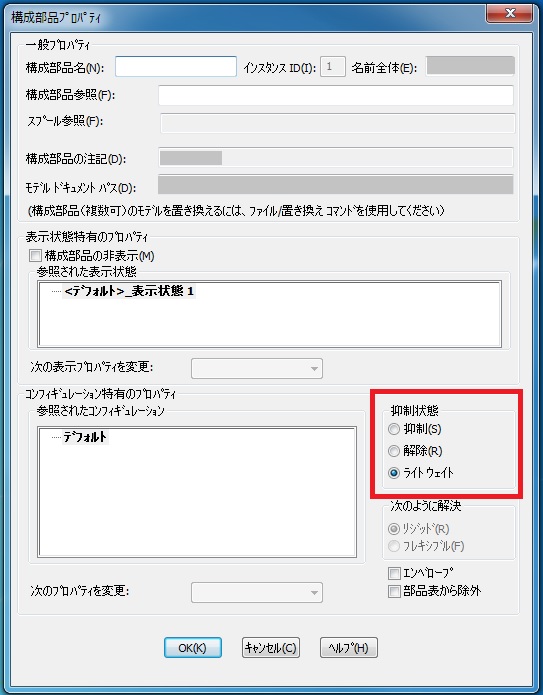
Open the assembly, right click on the part in the tree, "Lightweighting" in the component properties
When opening an assembly, choose how to display it and make it lightweight.

File→Open→select assembly in dialog box→select Lightweight in Mode→open
Always lightweight when opening assemblies
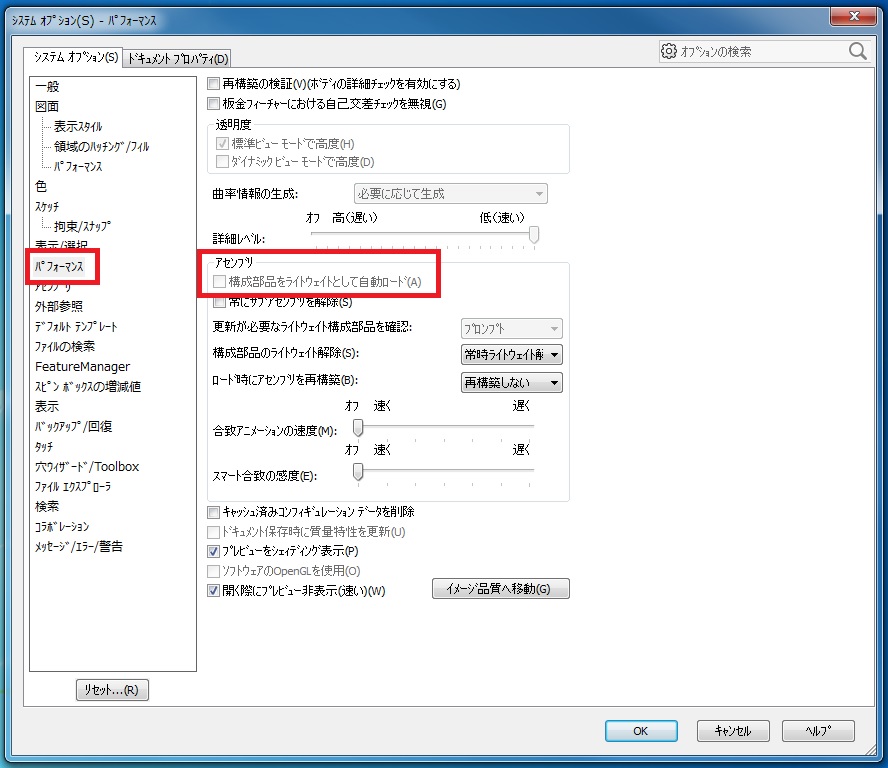
Options→System Options tab→Performance→Assembly and select autoload components as lightweights. *I do not use this option.
Operation that can be done even in lightweight conditions
The following operations can be performed on parts whose assemblies are too heavy and lightweight
- Adding and Deleting Matching Relationships
- Measuring, interference detection and collision detection in evaluation.
- Selecting edges, surfaces, and other components.
- Assembly Feature Functions
- Dimensions and mass can be measured.
- A cross-sectional view can be generated
- An exploded view can also be generated.
- Can also simulate machine operation (physical simulation)
That's it.
RELATED:Solidworks